Breaking

Showing posts with label Gadgets. Show all posts

Sunday, March 04, 2018

Samsung Gear Fit 3: what we want to see

null
The Samsung Gear Fit 3 could be one of the best fitness trackers of 2018 – if it launches in 2018. The truth is that we don’t know anything about it yet, but based on the strength of its predecessors were somewhat excited by the prospect of it.
The Samsung Gear Fit 2 Pro is currently sitting at number two in our best fitness trackers list, and that’s despite it being a conservative upgrade on the Gear Fit 2– if the Gear Fit 3 is an upgrade worthy of a new number then it could be very impressive indeed.
We’ll add all the news and rumors to this article as we hear them, but in the meantime, you’ll find a wish list of what we want from the wearable, along with some educated guesses as to what it might feature and when it might launch.

Cut to the chase

  • What is it? Samsung's next fitness tracker
  • When is it out? Possibly late 2018
  • What will it cost? Likely upwards of $199 / £209 (around AU$370)

Samsung Gear Fit 3 release date and price

There isn’t any release date news about the Samsung Gear Fit 3 yet, but there’s a chance the wearable will follow the lead of the Gear Fit 2 Pro, which was unveiled on August 30, 2017, at IFA 2017, before hitting stores in October 2017.
So we might see the Gear Fit 3 at IFA 2018, which takes place August 31 – September 5. Though the Gear Fit 2 was announced in June 2016 and not at IFA, so there’s no guarantee of that.
As for the price, all we can do there is look at the current model too. The Gear Fit 2 Pro launched for $199 / £209 (about AU$370), so there’s a chance the Gear Fit 3 will have a similar price.
So far we don't know anything about the follow-up to the Gear Fit 2 Pro

Samsung Gear Fit 3 news and rumors

So far there aren’t any Samsung Gear Fit 3 rumors, but we’d be surprised if the company wasn’t working on it and we’ll keep this page updated with all the news as we hear it.
In the meantime, we can speculate on a few things. For example, the Samsung Gear Fit 3 will probably have many of the same features as the Gear Fit 2 Pro, including a heart rate monitor, GPS and water resistance, along with a color screen.

What we want to see

While we have no news about the Gear Fit 3 as yet, there are plenty of things we want from it, such as the following.

1. A simple setup

Setting up the Samsung Gear Fit 2 Pro is a clunky experience, thanks primarily to the need to download multiple apps onto your phone just to get the most out of it.
So for the Gear Fit 3 we’d like to see a simpler, more streamlined setup process that allows you to get properly up and running (literally) in a matter of minutes.

2. Better battery life

With limited usage, you’ll get two to three days of life out of the Gear Fit 2 Pro and just one day with heavy use, which isn’t awful but certainly isn’t great.
While we’re used to charging our smartwatches daily, fitness trackers often manage to last a little longer, so we’d like to see an extra day or so added to the life of the Gear Fit 3.

3. A reliable barometer
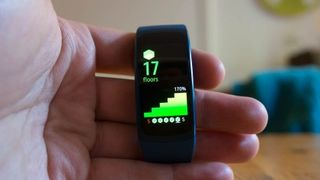
The Samsung Gear Fit 2's barometer wasn't always accurate
One issue we noted with the Gear Fit 2 was that water could mess with the barometer, causing it to think you’ve walked up many more flights of stairs than you actually have.
We’re not expecting this to be an issue with the Samsung Gear Fit 3 but we’ll certainly be disappointed if it is.

4. A reasonable price

While the Gear Fit 2 Pro isn’t wallet-weepingly expensive it did launch at a higher price than the Gear Fit 2, and that’s despite only being slightly improved and landing over a year later, so there’s a worry that the Gear Fit 3 could be a pricey wearable, but we hope Samsung keeps the price competitive.

5. Spotify pre-installed

It’s a small point, but despite Spotify (and specifically its offline mode) being one of the best features of the Gear Fit 2 Pro, it didn’t come pre-installed, even though a bunch of apps did, so we’d like to see the music streamer ready to go out of the box for the Gear Fit 3.

6. A refreshed design
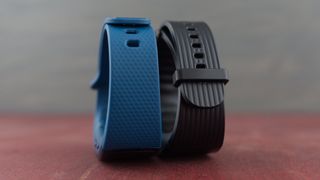
The Samsung Gear Fit 3 could do with a design refresh
The Gear Fit 2 Pro has a fairly nice design, but it’s also pretty much exactly the same as the design of the Gear Fit 2, so we’d like to see Samsung freshen things up a bit for the Gear Fit 3, or even just give buyers a greater selection of colors to choose from.

7. A significant upgrade

The Gear Fit 2 Pro is an accomplished fitness tracker, but it’s only a small upgrade on the Gear Fit 2, so for Samsung to stay relevant and excite us we want some big upgrades from the Gear Fit 3.
That could take the form of new sensors, more metrics, greater accuracy, improved smartwatch features or any number of other things, but we hope Samsung does something to make it stand out.

Saturday, March 03, 2018

Now you can Chromecast your Arlo camera feeds with Google Assistant


Netgear’s Arlo line of wire-free security cameras aren’t exactly the cheapest cameras on the market, but they’re super popular, cute to look at, filled with features, and now they’re getting Google Assistant support.
Once you add your Arlo cameras to the Google Home app (most of the Arlo line is supported), you can ask Google Assistant to pull up any of those camera feeds. You can stream the video to Google Assistant on iOS and Android, but the real fun is in the Chromecast integration. It works a little something like this:
”Ok Google, show Front Door on Living Room TV”
Other security cameras, including Logitech’s Circle and Nest Cam IQ, already have shipped with Google Assistant, too. With Nest Cam IQ you can actually use the camera’s built-in microphone and speaker as a limited Google Home, but Netgear hasn’t gone quite that far with its Arlo integration.
It’s also important to note that most Arlo cameras already work with any Alexa device that has a screen, such as a Fire TV, Fire Tablet, or Echo Show, and at least the Arlo Baby Smart HD works with Apple’s HomeKit for Apple TV support.
Voice assistants have always shined in two areas: setting timers, and controlling smart homes. It’s nice to see that Google Assistant and Alexa integration are becoming default features for these tiny smart cameras we’ve scattered around our homes.

The best and worst of Mobile World Congress 2018

Image result for Mobile World Congress 2018:
Mobile World Congress 2018: what happened? Maybe it’s best to start with what didn’t happen: Huawei didn’t have a new flagship phone, LG rebadged its old flagship phone, and Motorola and HTC had no phones to show at all. The traditional deluge of new super-specced phones just wasn’t here as it usually is.
But that didn’t leave us with a boring show — far from it. Nokia reached back into the archives to revive another classic, Google’s hardware partners presented their first Android Go devices, and the pervasive buzzwords of 5G and AI were everywhere. There were even some cool laptops to look at. Here are the highlights, followed by the unfortunate lowlights.

THE BEST

THE DEMISE OF SCREEN BEZELS

Nokia 8 Sirocco.
 Photo by Tom Warren / The Verge
Whether companies call them full-screen, all-screen, FullVision, or Infinity Displays, there’s no mistaking the fact that a modern phone in 2018 is most readily recognized by the scarcity of its bezels around the screen. This is an awesome thing, allowing companies like Asus to give us 6.2-inch flagship phones within a smaller physical footprint than their previous 5.5-inch devices. Such has been the transformation between last year’s Zenfone 4 and this year’s Zenfone 5. As to the wider mobile industry, we’ve gone from Samsung and LG being the exception with their vanishingly thin bezels in 2017 to now being the norm.

SAMSUNG’S GALAXY S9 AND S9 PLUS

Samsung Galaxy S9 Plus and S9.
 Photo by James Bareham / The Verge
You may have been disappointed by the incremental nature of Samsung’s upgrades this year, but it’s hard to argue that there was any better phone at MWC than Samsung’s new flagship duo. With a new dual-aperture camera, a fingerprint reader now sanely position in the middle of the back, and the best and latest processors, the Galaxy S9 is a formidable giant that will tower over the Android phone industry for at least the rest of this year. Its similarities to the existing Galaxy S8 are a strength rather than a hindrance: that phone was one of the best-designed handsets last year and remains a class-leading device today.

NOKIA’S 8110 MATRIX PHONE

Nokia 8110.
 Photo by Tom Warren / The Verge
Yes, we are all suckers for gadgets that stir up feelings of nostalgia for our lost (or dwindling) youth. HMD Global, the company exploiting the Nokia brand, has shown itself an expert in refining and updating classic models from the Nokia archive for the modern world. Pricing the 8110 at less than $100, the company gives you a surprising amount of advanced functionality to go with the familiar slider styling. This phone has LTE, Google Assistant and Google Maps, Twitter and Facebook apps, Snake (because it has to), and a promised standby time of 25 days.

LENOVO’S AWESOME LITTLE CHROMEBOOKS

Lenovo 500e Chromebook.
 Photo by Vlad Savov / The Verge
The not traditional fare for a phone show, but Lenovo’s Chromebooks for schools left a positive impression here at MWC. Each of them has been ruggedized to withstand drops and spills, and the note-taking capabilities of the two higher-end models are great. One allows you to take notes with a regular pencil directly on the screen, while the other has a lag-free stylus input that’s delightful to use. The most expensive among them is a super affordable $349, which is roughly what netbooks used to cost, and there’s more than a passing similarity between these ultra-basic Lenovo Chromebooks and the classic Eee PCs from years ago.

VIVO’S APEX CONCEPT PHONE

Vivo Apex concept phone.
 Photo by Sam Byford / The Verge
Vivo grabbed a lot of attention at CES 2018 by being the first company with a fingerprint reader integrated directly into the display, and it followed that up with a concept phone at MWC that was even more aggressively futuristic. The Apex concept device strips the bezels back even further than we’re now getting used to, and it achieves that by vibrating the screen so as to produce sound without an earpiece. Vivo also shifts the selfie camera to a pop-up module that extends from the top of the phone like a periscope. The Vivo Apex provided a fun exhibit of the current thinking and deliberation among phone designers looking for the next breakthrough.

THE WORST

THE RISE OF IPHONE X COPYCAT NOTCHES

iPhone X and Zenfone 5.
 Photo by Vjeran Pavic / The Verge
The flip side of the new, slimmed-down display bezels is that they allow companies to do weird things with the particular layout and design of their screens. And many, far too many, at MWC 2018 have chosen to simply copy the look of the notch in Apple’s iPhone X. It’s a cynical move, which Asus is especially guilty of and unapologetic about. No one is even attempting to emulate Apple’s Face ID, which is the main reason for the iPhone’s notch; companies are just aping the Apple aesthetic with their own cosmetic alterations. The Asus Zenfone 5 thus represents both sides of the new phone screen trends: the good of slimming bezels and the bad of a deliberately derivative design.

THE HEADPHONE JACK IS BECOMING A RARITY

Sony Xperia XZ2.
 Photo by Chris Welch / The Verge
You know those big old ports on the back of desktop computers that companies still keep supporting many years after no one even remembers what they were for? That’s how the mobile industry perceives the headphone jack nowadays. It’s treated as legacy hardware. As such, the 3.5mm audio jack continues to be available on budget phone models (along with the awful Micro USB connector) and from some companies unwilling to follow the mainstream trend, such as Samsung and LG. This year, Nokia and Sony both introduced new flagships without a headphone jack, with their hope being that superior Bluetooth audio codecs will cover for the loss of the convenient, simple, and once-upon-a-time universal 3.5mm wire.

SAMSUNG’S AR EMOJI

AR emoji galaxy s9
Samsung AR Emoji.
 Photo by Sam Byford / The Verge
They are dreadful, aren’t they? In its effort to keep pace with Apple’s iPhone and iOS, Samsung this week introduced its answer to Animoji in the form of its own AR Emoji. Technically speaking, these are rather impressive facial scans, given that the Galaxy S9 only uses the front-facing camera and no additional specialized equipment to produce them. But in practice, you get some rather weird, misshapen creations, whose facial animations are worse than anything we’ve seen since Mass Effect: Andromeda came out.

LG’S CYNICAL V30 REBADGE

LG V30S next to LG V30.
 Photo by Vlad Savov / The Verge
There are many industries in which a company will take an existing product, make a couple of cosmetic tweaks, and then reissue it under a new brand name. With phones, however, the rate of technological change and progress has always been so fast as to make that unnecessary. In 2018, LG has shown that the mobile industry is starting to fall in line with others by reissuing the LG V30 under a new product title of LG V30S ThinQ. The new V30 is identical to the old one, save for the addition of some extra RAM and storage. Everything novel about the V30S, of which there isn’t much, will be back-ported to the V30 in a software update. So LG simply used MWC 2018 as a launch platform for a software patch. Underwhelming to an extreme.

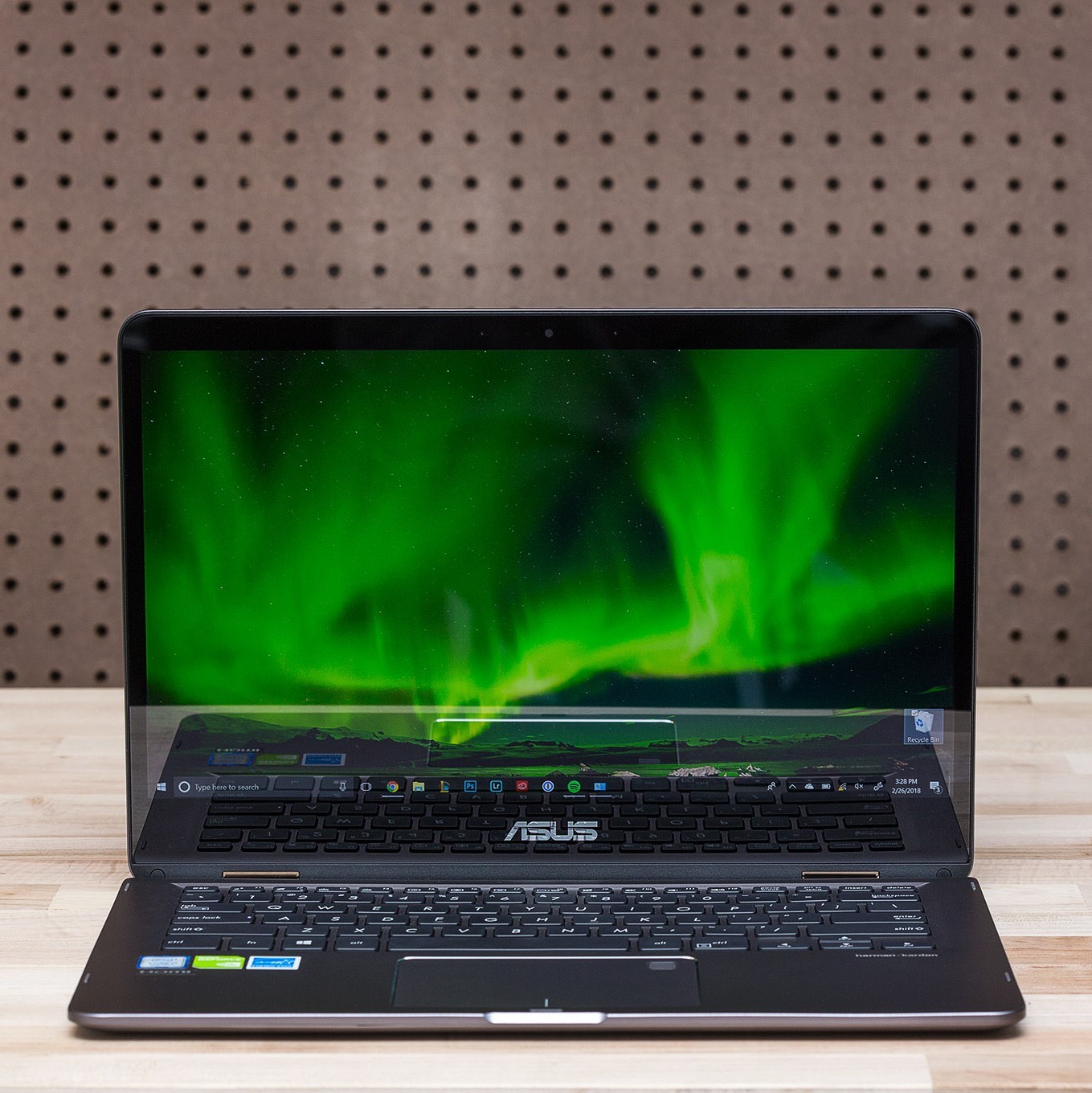
ASUS ZENBOOK FLIP 14 REVIEW: PORTABLE POWER

Image result for ASUS ZENBOOK FLIP 14

The ZenBook Flip 14 is a 2-in-1 with a twist

Intel and AMD are still working on their collaboration for more powerful GPUs in ultrabooks, but the ZenBook Flip 14 uses Nvidia’s new GeForce MX150 chip. The MX series of chips is Nvidia’s solution for boosting graphical performance in ultrabooks and 2-in-1s. Performance-wise, the MX150 fits into the lower branch of GTX 10 cards, beneath the VR-capable GTX 1050.
So, with all that power, can the ZenBook Flip 14 be a great portable and game laptop? Let’s find out.

This particular ZenBook Flip 14 costs $1,299 and is available online, but a Core i5 / 8GB / 256GB SSD configuration exists at the starting price of $999. Here, I have a 1.8GHz quad-core Core i7-8550U, 16GB RAM, the GeForce MX150 graphics chip, 512GB SSD, and a 1920 x 1080 touchscreen. These are not the specs of an e-sports-quality gaming laptop, but they’re perfect for mobile power users and students looking for a fast ultrabook, with enough grunt for apps like Photoshop.
Finally, you get Windows Hello fingerprint login and a Windows Ink pen for doodling in the box.
Asus is no stranger to producing ultrabooks or gaming laptops. The ZenBook attempts to blur those lines with its discrete GPU. But as a productivity machine? The ZenBook Flip 14’s user experience is enjoyable.
Let’s start with input devices. The keyboard has an excellent backlight but has similar travel to the MacBook Pro’s butterfly keyboard. It’s not my favorite (or my top five), but it works.

The touchpad is smooth, and, to my surprise, includes a sensor with Windows Hello fingerprint protection. But there is something odd: it’s prone to misreading my fingerprint. After mapping more than one fingerprint and attempting to unlock the ZenBook, it frequently failed and asked me to enter my PIN. This is the first time I’ve come across a finicky Windows Hello fingerprint sensor, and I hope Asus can improve its accuracy via an update.
The speakers are Harman Kardon branded, with decent volume. It sounds quite rich and “fills” the laptop and some of the surrounding room, even at 30 percent volume. At the same time, they lack clear sound reproduction due to being mounted underneath the computer. On a bed or your lap, you’ll be muffling the speakers unless you flip the ZenBook’s screen around intent or tablet mode. But who wants to flip a screen around just to hear it clearly?
As for the display, it’s good. A display with 100 percent AdobeRGB rating makes me very happy. There’s also the 178-degree viewing angle, which is a necessity for the tent and easel modes. It’s all brightness, contrast, and colors.
The 360-degree hinges that hold the laptop together are unassuming. If you look closer, they appear to be the most polished and robust part of the Zenbook Flip 14 — and, sure enough, they’re sturdy and smooth. But there is a hint of flex on the lid when the laptop is closed.
One more note: the webcam. It’s 720p, quite underwhelming, and performs more like a placeholder than something you’d want to use with any regularity.


To keep battery life stable and to avoid running hot with a discrete GPU running at all times, Asus is also employing Nvidia’s Optimus switching technology. When you’re not using a graphics-intensive app, the ZenBook flips back to its Intel display chip.
However, Nvidia’s MX150 has just 2GB of memory, which could go a long way in a GTX 1050 or 1060, but not here. League of Legends, a relatively lightweight game, frequently dropped to 33 fps during team fights, on medium-high settings.
My years of PC gaming have taught me that if a machine can’t cruise through League of Legends, it’s not going to impress me anywhere else. So I tried two other “easy” games to run: Overwatch and Counter-Strike: Global Offensive. The ZenBook Flip 14 couldn’t muster average frame rates above 40 fps for any of the three games.
Yes, the MX150 can push some graphics and handle Photoshop / Lightroom with ease, but it can’t game; you won’t catch me outside with this at a LAN meetup.


The ZenBook Flip 14 has great build quality. It’s compact and light, with fans that keep the system cool and quiet — unless you’re gaming, of course.
Ports-wise, the ZenBook 14 is decently equipped two USB 3.0 ports, a 3.1 USB-C (non-Thunderbolt 3 not for charging the laptop), HDMI-out, charging port, microSD card slot, and finally, a 3.5mm audio jack.
On paper, many of the ZenBook’s aesthetics seem like a treat: a 0.54-inch thickness, a feather-like weight of 3.3 pounds, and lots of ventilation underneath the system (toward the back). Only the vents, which get hot under strain, make using it uncomfortable on your lap for a more than a half-hour.
Other nitpicks include that the fingerprint-magnet finish can only be used with the Fn plus an F1-F12 key to change things like brightness and keyboard backlighting when those should be toggled by default.

I also would have appreciated more of a tactile distinction between the volume rocker and the power button. They’re both on the left side of the machine and very easy to mistake one for the other; there are no nubs to feel around for (only the power light). You either turn the system to look for it, or figure out that only one of depresses while the other is a volume rocker.
The ZenBook Flip 14’s battery is one of its prime features. On high-performance mode, I can eke out around eight to nine hours of battery life. But, if I treat the ZenBook as the productivity machine it was intended to be and dial back some of the power management, I can reach 11 hours, easily.
Those are good usage numbers, no matter how you spin it, especially with a discrete graphics chip and a Core i7 processor. When you’re all out of power and need to charge up, you’ll be using a small, squat Asus power brick with a proprietary power jack. There’s no USB-C charging anywhere, which I would have scored as one of the ZenBook’s best traits if it had it.

In the end, the ZenBook Flip 14 is a good 2-in-1 system, with the impressions of a normal laptop, for less than $1,300. Great build quality, fast processors / graphics cards, and dependable battery life are common qualities in an ultrabook, but the ZenBook takes that up a notch by giving you a bit more power.
The ZenBook Flip 14 may not have the level of polish the last Lenovo Yoga had, but unlike the Yoga, it has a discrete graphics chip, the latest Intel chip, and it still has the ability to keep good battery life. It just won’t win any games. 
7.5VERGE SCORE

GOOD STUFF

  • Sharp looks
  • Fast processor plus a discrete GPU
  • Great battery life
  • Lightweight
  • Bright, colorful display

BAD STUFF

  • Speakers face downward
  • Fingerprint scanner inconsistent
  • Not great for even light gaming
  • Keys are shallow
  • Poor front-facing camera quality

Comments system

Disqus Shortname

Comments System

Disqus Shortname

Disqus Shortname

theme-daddy

Comments System

[blogger][disqus][facebook]
Powered by Blogger.