Breaking

Showing posts with label Affiliate Marketing. Show all posts

Thursday, March 14, 2019

How Much Traffic Do You Need To Make $100,000 With Google AdSense

How Much Traffic Do You Need To Make $100,000 With Google AdSense
Is it really possible to make $100,000 a year from Google AdSense (or by selling ads on your website/blog)? If so, then the real question is how much traffic do you really need to make big bucks with Google AdSense?
While it’s true that we can’t predict the Google AdSense income exactly, we can optimize the ads in different ways so as to make the most out of it.
Google AdSense
Also, you must make sure that your website category is advertising friendly because your AdSense income depends a lot upon the category of your website. You can use the Google AdWords Keyword Planner tool to find out the competition in your industry.
If there is enough competition (i.e. if the suggested bid by AdWords for keywords in your niche is high) then we can assume that Google will fill your ad spaces with high paying ads (see how AdSense works).
For example, if you Google search “loans” then you’ll see a lot of ads so it means that if you have a blog related to personal finance then there will be enough competition for your ad space.
Now I’ve randomly added a few keywords to Keyword Planner to find out its suggested bid by AdWords. Here they are:
Google AdWords Keyword Planner
As you can see, the competition for keywords related to “finance” is very high compared to keywords related to “food”. Of course, the suggested bid is just an estimate and the real cost-per-click varies a lot.
But still, even if it’s $5 then it means a lot. Why? It’s because the cost per click to advertise on Google is very high compared to the cost per click on Google Display Network. So if an advertiser is paying $0.50/click on Google then he may be paying only $0.10/click on Google Display Network.

How Much Traffic Do You Need To Make Money With AdSense

Let’s say you want to make $100,000 a year from Google AdSense and/or Google AdSense alternatives.
$100,000 divided by 365 = $274 a day.
So, you have to create either: 274 pages that earn $1 a day OR 548 pages that earn 50 cents a day OR 1,096 pages that earn 25 cents a day (which sounds reasonable, right?). Let’s say you have 1,096 high-quality blog posts and you earn $0.25 per click from AdSense.
I have analyzed the traffic and AdSense stats (using Google Image Search) of several websites including my own blogs and websites.
Google AdSense Earnings
From my analysis, I found that the average Page CTR is around 1% (or it’s something that we can achieve easily). But it really depends upon your niche, web site design and other factors.
In fact, I have achieved a Page CTR of over 20% in 2007 for a niche website and was making $100+ a day from Google AdSense alone.

Let’s Do The Math To Make $100,000 A Year With Google AdSense

Let’s assume that you have a Page CTR of 1% and your average CPC is $0.25 (I believe it’s quite an achievable target unless your keywords have no advertiser competition – e.g. a recipe blog).
Some of the top paying AdSense niches are Finance, Internet Marketing, Technology, Web Hosting, Internet & Computers, Software, Health etc. and some of the lowest paying AdSense niches are Entertainment, Arts, Movies, Celebrity Gossips, News blog, Jokes, Wallpapers, Quotes, Recipes, Photoblogs etc.
As mentioned earlier $100,000 a year means you have to earn $274 a day. If your average CPC is $0.25 then you need 100,000/0.25 = 400,000 clicks a year (or approximately 1,000 clicks a day) to earn $100,000 a year from Google AdSense. Assuming that your Page CTR is 1% you need approximately 100,000 page views a day.
Now, let’s say your “Bounce Rate” (it is the estimated percentage of visits to your website that consist of a single pageview) is 100%. It means that you need 100,000 unique visitors a day itself to generate 100,000 page views a day.
In a nutshell, you need 100,000 visitors a day to make $100,000 a year from Google AdSense alone (with a CTR of 1% and CPC of $0.25).

Google AdSense Glossary

Page Views
A page view is what Google counts in your reports every time a user views a page displaying Google ads. We will count one page view regardless of the number of ads displayed on that page.
For example, if you have a page displaying three ad units and it is viewed twice, you will generate two page views.
Clicks
For standard content ads, Google counts a click when a user clicks on an ad.
For link units, Google counts a click when a user clicks on an ad on the page of ads, after selecting a link in the link unit.
Page Click Through Rate (Page CTR)
The Page Click Through Rate (CTR) is the number of ad clicks divided by the number of impressions or page views that you have received.
Page CTR = Clicks / Page Views
For example, if you received 5 Clicks from 100 Page Views, then your Page CTR would be 5%. (5/100*100=5%)
Cost Per Click (CPC)
The Cost Per Click (CPC) is the amount you earn each time a user clicks on your ad. The CPC for any ad is determined by the advertiser; some advertisers may be willing to pay more per click than others, depending on what they’re advertising.
Page Revenue Per Thousand Impressions (Page RPM)
Page Revenue Per Thousand Impressions (RPM) is calculated by dividing your estimated earnings by the number of page views you received, then multiplying by 1000.
Page RPM = (Estimated Earnings / Number of Page Views) * 1,000
For example, if you earned an estimated $0.15 from 25 page views, then your page RPM would equal ($0.15 / 25) * 1000, or $6.00.
Estimated Earnings
Your account balance (or earnings) for the time period selected.
But you are not using AdSense alone to monetize your website, right? You can make more money by selling direct banner ads, in-text ads, CPM ads, sponsored links, affiliate marketing, etc.
Cost Per Impression (CPM) Ads
So let’s say you’re selling direct banner ads and is also selling CPM advertising which is again an effective way to monetize your website.
What are CPM ads?
CPM (Cost Per Mille) stands for Cost Per 1,000 Impressions. CPM networks pays for every 1,000 impressions you generate. If a CPM ad network is paying you $1 CPM then it means that they’re paying you $1 for every 1,000 page views you generate.
CPM Network earnings totally depend upon your traffic quality but you can expect anywhere between $1 – $3 per 1,000 impressions. So, if you generate 100,000 page views a day then you can make $100 – $300 a day from CPM Networks. Again, you can earn $100 – $300 (or maybe even more) a day by selling banner ads directly to advertisers.
Now, you can split the traffic into three as you’re earning $300 each from 3 advertising networks. It means that you need 100,000/3=33,333 unique visitors a day (with a bounce rate of 100%) to make approximately $274/day.
Again, if you have an authority blog then your bounce rate will never be 100%. In that case, you can expect an average page view of 1.5 per user. It means that 50% of your visitor's exit from the landing page and others visit more than one page on your website.
All in all, you need approximately 20,000 visitors a day to generate 30,000+ page views and it can earn $274 a day which translates to $100,000 a year in advertising revenues.
Need a little more help reaching that $100,000/year goal? Add commissions from Affiliate Programs as well into the equation and you can hit that $100,000 goal with much less traffic.
In fact, in 2008 I was averaging $200+ a day from less than 200 daily unique visitors with affiliate marketing. It was possible because when it comes to affiliate marketing it’s all about traffic quality and not traffic quantity.
How To Optimize Google AdSense
You can optimize your AdSense ads in several ways. For example, you can try text ads only, image ads only, text & image ads to find out which ad format is performing better.
Google recommends wide ad formats like 728 x 90, 336 x 280, 300 x 250, and 160 x 600 as they’re more advertiser-friendly.
When you use the recommended ad formats, your AdSense ads should perform well because of increased competition. Why? Because the recommended ad formats by AdSense are the most popular ad formats and hence almost all advertisers must be targeting those ad formats.
So it increases the competition naturally and Google will be showing the highest paying ads on your website. But it’s also a good idea to try different ad formats as Google is now offering a variety of ad formats (including responsive ad units).
I would recommend A/B testing on your website to find out the best performing ad formats. Like, you can do A/B testing by trying different ad types, ad formats, and colors, and then by placing your ads at different sections on your website (above and below the fold) to find out which position is offering the best CTR).
But what if your AdSense earnings are low even though you have good a CTR? In that case, I would recommend ad controls though Google mentioned that blocking any ad will reduce our potential earnings.


Google says:
It’s a myth that filtering ads can prevent ‘low-paying ads’ from appearing, so as always, we recommend blocking only those ads that you feel are unsuitable for your users.
Finally, you can tweak the AdSense click-through-rate by using an AdSense friendly template for your website/blog. But make sure that your website is not ad heavy as it will impact the user experience in a negative way.
And as always, you can focus on creating awesome content and driving more traffic so that it increases your Google AdSense earnings (and your advertising revenues) naturally.
BONUS
I have recently published a blog post that was essentially a reverse of this topic. It’s basically about what it takes to hit your traffic and income goal (assuming a traffic goal of 1,000,000 pageviews and an income goal of $3,000 per month).
I have subcategorized the topic into:
  • How Much Traffic Does Your Blog Need To Make $36,000 Per Year In Ad Revenue — tells you how many page views are required to generate $36,000 (that is, $3,000 x 12) in advertising revenue (affiliate income will be a bonus for you) per year based on real case studies and examples.
  • How Many Blog Posts Do You Need To Generate A Million Pageviews Per Month — tells you how many blog posts your website might need to generate one million page views per month?
  • How Much Money Should You Invest In Content Marketing To Generate A Million Pageviews Per Month — tells you how much money should you invest in content creation to hit your traffic goal although it differs on a case basis.
  • How Long Does It Take To Reach Your Traffic Goal — tells you how much time your website will take to hit your traffic goal using my own blog as a case study.
In other words, it’s written to decode:
How Much Money Should You Invest In Content Marketing To Generate 1,000,000 Pageviews And $3,000 Per Month
Here you go:

It’s the result of homework that I did with a goal to increase the traffic of my blog 5x from here. So, it’s written purely based on my own traffic insights plus few case studies and traffic numbers of different blogs in different niches.
There’s every chance that the actual figures applicable for your own blog could be a lot different from mine. Needless to say, it ultimately depends upon your website’s niche, authority, and marketing efforts.
Also, your final income levels could be a lot higher or lower than the figures that I have mentioned as again, it depends upon your website and its different metrics.
Happy Blogging! :)

Saturday, February 24, 2018

Over 20 Ways to Make $10 a Day Online

Some people aren’t looking to get rich online, they are simply looking to earn a few hundred bucks each month to help out with the bills. Thankfully, not every opportunity requires a scheduling commitment. And many side hustle options can help you make $10 a day online with just a little ongoing work.
Keep in mind, none of these are guaranteed. Some places may have more work or better offers on some days than others. So, as they say, make hay while the sun shines. It’s also a good idea to combine a few opportunities as well to ensure you are meeting your $10 a day goal without getting burned out or overwhelmed.
  1.  Ebates pays $5 for every person you refer who makes a qualifying purchase ($25). They also offer an awesome referral bonus each quarter allowing you to earn even more for referring more people. For a limited time, get a $10 gift card when you sign up through my referral link and make your first purchase.
  2.  Ibotta pays $10 for every two people you bring into the program who redeem their first rebate within two weeks. Like Ebates, this is an easy way for your friends to earn a little extra cash that can be used in an emergency or towards holiday shopping so they may be eager to join. For a limited time, you (and your friends) can get a $10 bonus when redeeming your first rebate.
  3. Clickworker lists a lot of little online tasks like writing or search engine optimization. The site states that pay is around $9 per hour. The biggest complaint I have seen is that you have to wait for your work to be approved before you can get paid and that can take some time. Once approved, pay is weekly by PayPal or direct deposit.
  4. mTurk is a lot like Clickworker in that it is “crowdsourcing” tasks in that a lot of people are completing small segments of a big project. The tasks here are a lot more varied with everything from transcription to surveys. It’s “penny projects” in most cases, but it’s easy work and you can pick up jobs as you see fit.
  5. Fiverr allows you the opportunity to set up a Seller profile and offer small gigs to Sellers at $5 each. You may want to shoot for completing three gigs per day instead of just two to allow for Fiverr and PayPal fees. Or, offer a great upsell for an additional $5 per gig such as speedy delivery.
  6. iWriter is what many would call a content mill. Contracted writers are churning out a lot of articles for website owners for little pay. On the other side of that coin, you can usually stick to topics you know and require very little research to up your income potential. Seriously though, the pay is around $2.50 per 500-word article for newcomers. When you reach Elite status, you can earn $15+ per article.
  7. Famebit may have a few opportunities for you to reach your daily goal if you have a large, engaged social media following. Their sponsors are looking for those on YouTube, Twitter, Facebook, Instagram and more. You get to set your rate for social media campaigns.
  8. InstaGC is another site that will pay you for doing online tasks like surveys and watching videos. The method for earning $10 a day that I have seen recommended by a few InstaGC pros is sticking to Offers, Crowdflower, Peanut Labs, Persona.ly and downloading apps.
  9. Starting a blog may take a lot more upfront work before seeing any return than many of the other options on this list, but it can be worth it. If you love learning and talking about a particular subject give it a whirl. The monetary investment is minimal and you can make money through display ads, sponsored posts and affiliate marketing.
  10. Turo may be a great opportunity if you live near a major airport hub. This site allows you to make money renting your car to travelers. The Turo calculator estimates that if you own a $20,000 car and rent it out just 15 days per month you could earn $6,501 per year. That’s almost double your $10/day goal.
  11. Website testing is one of my readers’ favorite work at home jobs. There are several sites that will pay you around $5 to $15 for giving feedback on websites. The work can be sporadic so I highly recommend signing up for several sites and then watching your email for tests to come in. They can get grabbed up quickly.
  12. Textbroker is another writing website that will allow you to come and go as you please. If you stick to those topics you know, you may be able to turn around articles quite quickly. Textbroker pays weekly!
  13. Bestmark is a mystery shopping company. What makes this one different is that they occasionally offer phone shops which means you never have to leave the house. Make sure your profile is filled out completely and you check your email frequently to pick up the best shops.
  14. Gigwalk will have you leaving the house, but it doesn’t take long to earn $10 completing small tasks with this app.
  15. Field Agent is very similar to Gigwalk in that you may be checking store displays, prices or inventory around town. Definitely give the apps a look before heading out of the house.
  16. Content Gather is another site that will allow you to earn money writing articles. It also has a referral program that allows you to earn 5% of your referrals’ transactions.
  17. ThredUp is an easy way to earn money from gently used women’s and children’s clothes. Request a bag. Pack up your unwanted items and mail them. Get a cash offer for your discarded goods. Granted, you will eventually run out of clothing to sell, but it’s a great way to get some fast cash. 
  18. Unclaimed property is a nice and easy way to put a few bucks in your pocket. It’s not long-term income, but if you have moved around a lot you may be surprised to find you have a paycheck or utilities refund waiting for you out there.
  19. Uber is one of the most well-known companies in the sharing economy. Get paid for giving rides around town.
  20. TaskRabbit will allow you to pick up a little work around town. Again, you will be leaving the house but you may find getting paid for a quick trip to the grocery store is totally worth it. Especially if you are going anyway.
  21. Direct Selling is an idea if you love sales and love a particular product. (You won’t sell stuff you don’t love.) Chloe + Isabel, for example, pays Merchandisers a base commission of 25% on personal sales. That’s a pretty standard commission rate. That means you need to sell $40 worth of merchandise per day to reach your goal. You will need to invest in a starter kit with these business opportunities so keep that in mind.
  22. Selling books can be a great way to make extra money. The going rate varies tremendously based on supply and demand. (Recent textbooks can earn a lot.) I ran through a handful of my books on Bookscouter and received bids from $1.50 to over $14 per book. Once you have gone through your own library, you can hit up thrift stores and garage sales.
  23. OneSpace is very similar to mTurk. The tasks available may be things like image tagging or transcription. Many gigs pay only $.10 each, so you will need to complete quite a few to see any considerable earnings. However, the jobs are short and easy in most cases.
  24. Search Engine Evaluation is a gig loved by many. It’s essentially looking at search results or ads and determining their relevancy and quality. There is a lot of flexibility in scheduling and the pay is around $12 per hour. Companies like Lionbridge, Leapforce and Appen hire for these positions.
Fancy Hands is a virtual assistant firm that performs small tasks for individuals and business owners. You may be setting an appointment or doing internet research. Each task has a set rate and you can pick and choose those that are of interest. This is a fast and easy way to earn a few extra bucks each day. Ten dollars a day may seem small potatoes to some, but that’s an extra $3,650 per year. That’s a mighty fine Christmas splurge, a nice investment into a passive income opportunity like a REIT or dividends. You can also use it to help fund your retirement through an IRA. After all, the only thing better than making money is making your money make more money.


 Source theworkathomewife.com 

DISCLAIMER 
This is a personal blog. The views and opinions expressed here represent my own and not those of the people, institutions or organizations that I may or may not be related with unless stated explicitly.

Also, my thoughts and opinions change from time to time as I come to learn more and develop my understanding of the things and issues that I am blogging about. This blog just provides a snapshot of the knowledge, views, and opinions that I hold at a particular point in time and these might most probably change over a period of time. I reserve the right to evolve my knowledge, thoughts, and viewpoints over time and to change them without assigning any reason.

My blog includes links to other sites/blogs operated by third parties. These are provided as a means of convenient access to you to the information/opinion contained therein. I am in no way responsible for the content of any other sites or any products or services that may be offered through other sites.

Comments are welcome. However, note that tasteless and insulting comments may be deleted. Any personal remarks and attacks may be deleted. The same holds true for off-topic comments. Any comments that reek of link spam or marketing messages WILL be deleted.
I am not responsible for the content in comments other than those made by me, or in blogs or other online content that I may link to.

ePayments - New Cryptocurrency Debit Mastercard


ePayments service - an electronic wallet with the possibility of issuing a MasterCard bank card.
The service itself is a product of Electronic Payments Association (EPA), registered in the UK and created in 2011. 
First of all, ePayments is created for people who, in one way or another, are related to online earnings: cryptocurrency trading, work on freelancing, cooperate with partner networks, engage in forex trading, etc. 

Order Your Card Now


ePayments Features


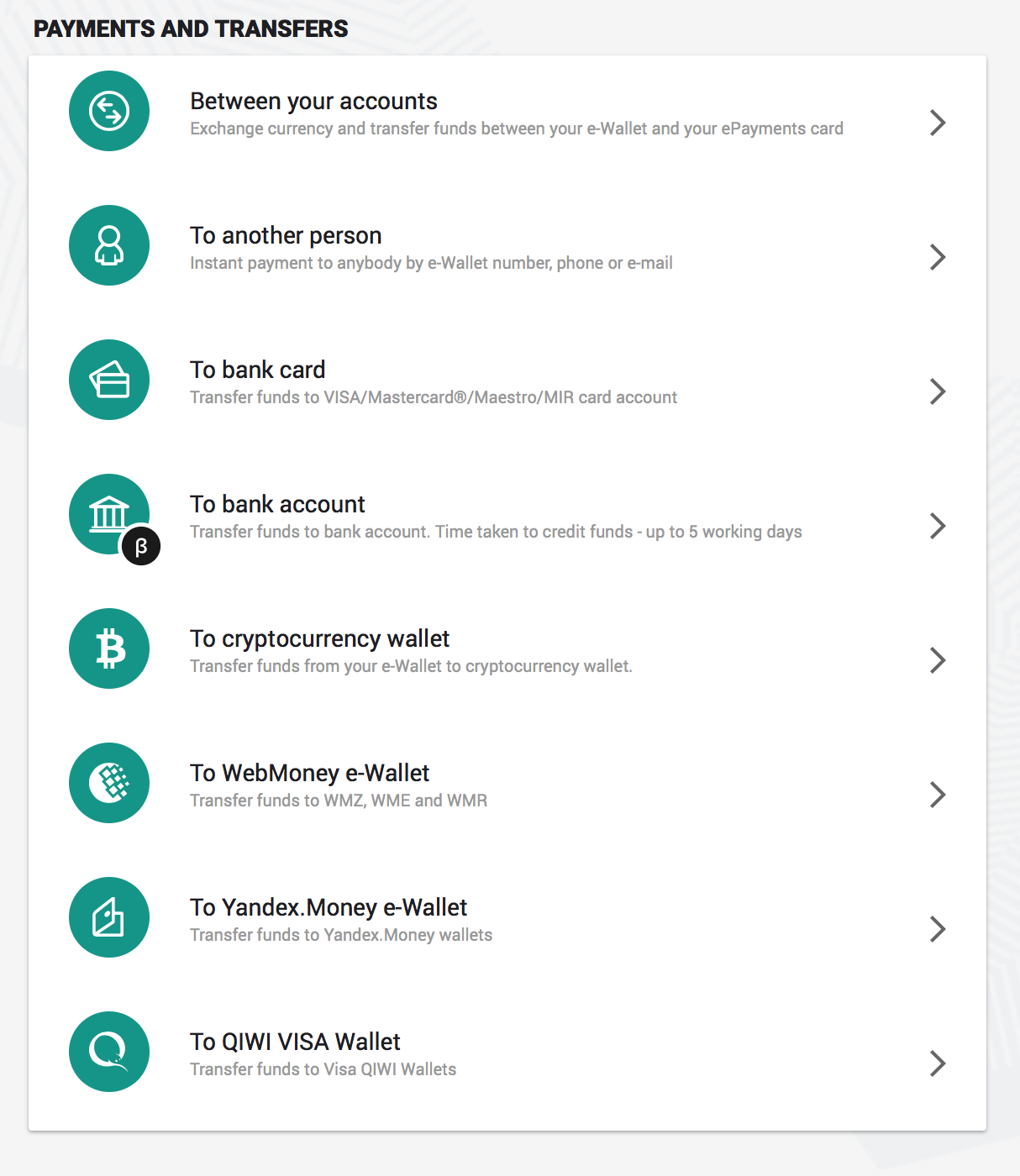
ePayments offers services for incoming and outgoing transactions:

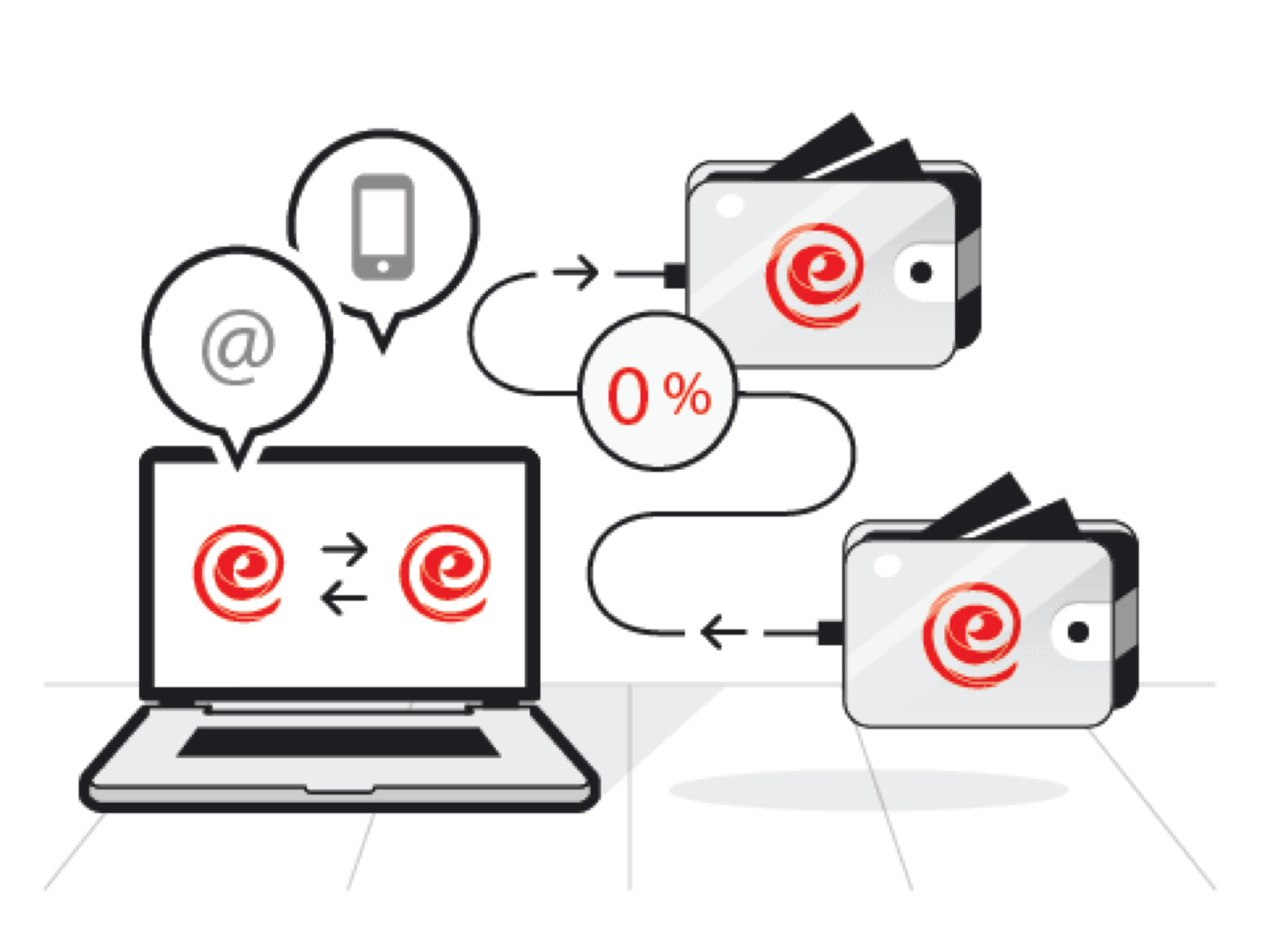
  • Translation within the system
  • Bank transfer
  • Transfers using VISA / MasterCard® / Maestro plastic cards
  • Branded ePayments Prepaid MasterCard
  • Webmoney
  • Bitcoin, Litecoin, Ethereum, Bitcoin Cash, Bitcoin Gold
  • Yandex money
  • QIWI
Any transfers within the system between its customers, as well as mass internal transfers are absolutely free. For the company's clients, there are three types of purses with currencies: the US dollar, the Euro and the Russian Ruble. Also free to enter and withdraw funds from ePayments Prepaid MasterCard, dollar or euro.
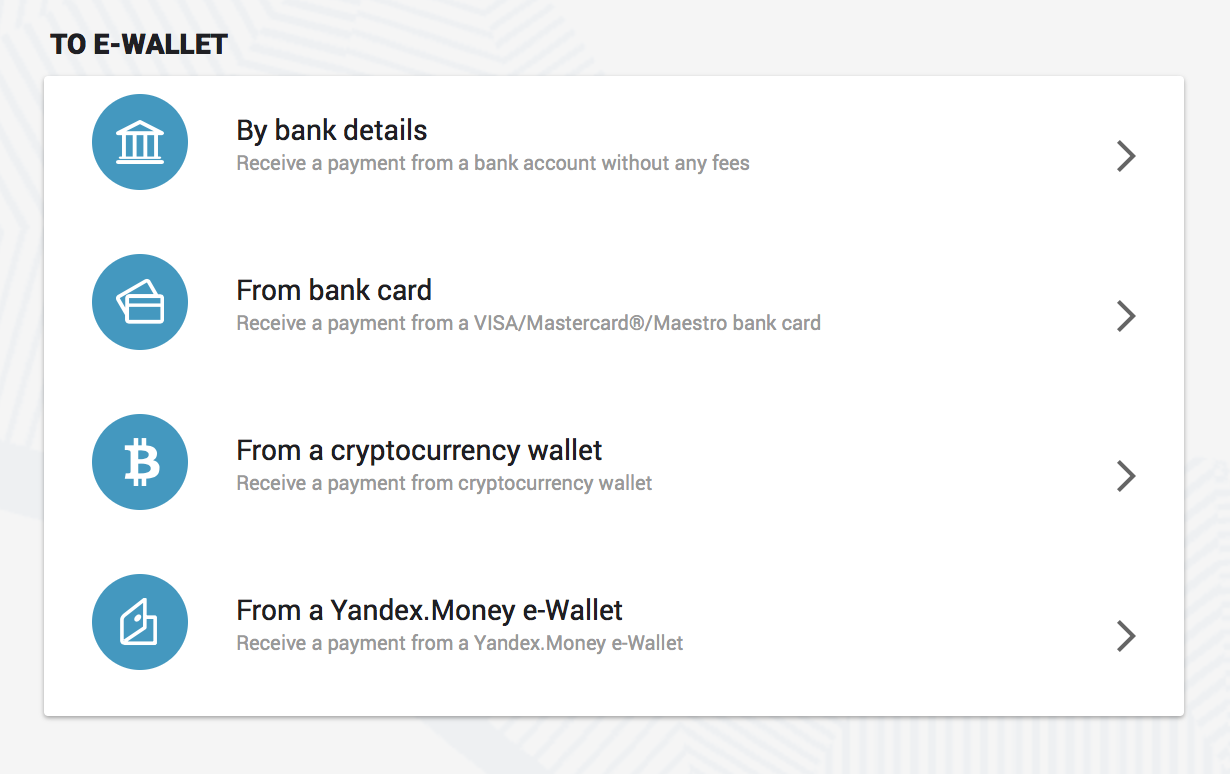
Depositing funds on ePayments
Bank Transfer - transfer free of charge;
VISA / MasterCard® / Maestro bank card - 2.6% commission;
Cryptocurrencies (BTC, LTC, ETH, BCH, BTG) - at the rate of ePayments.


Withdrawal from ePayments
Bank card - commission 2.90% (min. $ 3.50);
Bank account - commission 0.80% (min $ 85, max $ 135);
Cryptocurrency - at the rate of ePayments at the time of withdrawal;
WebMoney - 2% commission;
Yandex.Money - 2% commission;
QIWI - commission 2%.


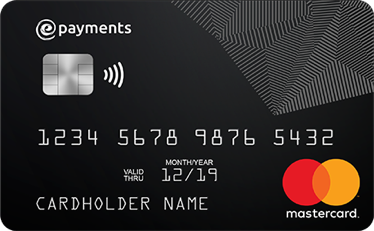
Plastic card ePayments Prepaid MasterCard
With the help of ePayments Prepaid MasterCard, you can instantly transfer funds to it without commission and pay in stores, or withdraw cash through ATM.
Shopping in stores is free of commission, subject to a transaction in the card currency or 2.6% in a currency other than the card currency at the MasterCard rate on the day of the transaction. Cash withdrawal with a commission of 2.60 $ in the card currency or an additional 2.6% in a currency other than the card currency at the MasterCard rate on the day of the transaction.
The cost of ordering ePayments Prepaid MasterCard is 5.95 $ or 4.95 €. The first 2 months of service are free of charge, then - 2.90 $ / month. The card is delivered by default by regular mail or, for $ 45 via DHL express delivery. The card is equipped with a chip and one-touch purchase technology (MASTERCARD® CONTACTLESS).
Incoming and outgoing payments between the purse ePayments and the ePayments Prepaid MasterCard are made without commission. The card can be paid in stores, as well as withdraw funds from the ATM.

Convenience and security ePayments
The interface of the site is ergonomic and intuitive. Practically there are no problems and issues with registration and verification. The site has an SSL certificate and fraud monitoring system to protect against fraud.
Any payment operation requires entering a payment password (it is different from the password of the personal cabinet). For greater security, the user can enable two-factor authentication through Google Authenticator and restrict access by IP.
Transfers inside the ePayments system are anonymous and do not transmit data about the owner of the wallet, but only his number.
In addition to the web version, ePayments offers an app version for Android and a version for iOS.

Getting started with ePayments
Electronic payment system ePayments is great for freelancers, forex clients, application developers and webmasters.
To increase the limits for transactions and add the possibility of ordering ePayments Prepaid MasterCard, you need to undergo a verification procedure. It consists, as usual, of the identification of the client's identity and confirmation of the registration address plus the completion of the questionnaire.

Registration, License and Reliability ePayments
Epayments Systems Ltd (ePayments) is registered in the UK and is licensed by the Financial Conduct Authority under the number 900172 for issuing electronic money and conducting payment transactions (plastic cards, bank transfers, etc). ePayments is as reliable as Skrill and Neteller since it has an identical license and similar control of the UK's financial regulator (FCA)
Despite the fact that the company was established in 2011, the license for activities was obtained in the summer of 2014.
Source: www.steemit.com

DISCLAIMER 
This is a personal blog. The views and opinions expressed here represent my own and not those of the people, institutions or organizations that I may or may not be related with unless stated explicitly.

Also, my thoughts and opinions change from time to time as I come to learn more and develop my understanding of the things and issues that I am blogging about. This blog just provides a snapshot of the knowledge, views, and opinions that I hold at a particular point in time and these might most probably change over a period of time. I reserve the right to evolve my knowledge, thoughts, and viewpoints over time and to change them without assigning any reason.

My blog includes links to other sites/blogs operated by third parties. These are provided as a means of convenient access to you to the information/opinion contained therein. I am in no way responsible for the content of any other sites or any products or services that may be offered through other sites.

Comments are welcome. However, note that tasteless and insulting comments may be deleted. Any personal remarks and attacks may be deleted. The same holds true for off-topic comments. Any comments that reek of link spam or marketing messages WILL be deleted.
I am not responsible for the content in comments other than those made by me, or in blogs or other online content that I may link to.

The Wirex Payment Card for cryptocurrency


Formerly called E-Coin, Wirex is a debit card meant to integrate digital money and traditional banking services. It is being marketed as a “hybrid personal banking platform” supporting both fiat and cryptocurrencies. It is issued by Wave Crest Holdings Limited, an electronic money service company licensed by the Financial Services Commission of Gibraltar with the company registration number 101302
Wirex URL:

Wirex Overview

Wirex is a London-based bitcoin debit card, mobile banking, and remittance service, provider. It is a limited company launched in 2015 with initial funding of around $200,000 from 93 investors (crowdfunding) through the online investment platform BnktotheFuture. Going by the slogan “Drive Your Money,” Wirex enables the linking of bitcoin wallets to Visa and MasterCard debit cards. It supports three currencies, namely US dollars, euro, and pound sterling. Wirex can be accessed through a desktop application or a mobile app.
Wirex or the original E-Coin was started by Dmitry Lazarichev, Pavel Matveev, and Georgy Sokolv. Lazarichev has experience and expertise and finance and entrepreneurial projects. Matveev worked as an IT developer for around a decade and has experience working with noted investment banks in different parts of the world. Sokolov, on the other hand, is an international sales specialist.

Wirex Account Registration

Signing up for a Wirex account is a quick process. You just have to go to the account registration page and fill out the registration form. The form only asks for your full name and email address. After submitting the filled out registration form, you have to confirm your email address by clicking on the Confirm Email button in the email you will receive from Wirex regarding your account registration. It shouldn’t take more than 15 seconds to complete these.
The email confirmation step, however, is not the only thing you have to do to finally access your account. There’s also a mobile phone verification step. You will be asked to enter your mobile phone to get your verification code. The process is also quick IF your mobile number is accepted.
In our experience, while doing this review, we had to try different numbers to finally complete the mobile phone verification process. We kept getting an error after trying several numbers from the same network. The error message shown does not offer any hint as to why we couldn’t proceed with the verification after entering our mobile number. It was only after trying a number from a different network that we were able to proceed.

Account Dashboard

The Wirex account interface is relatively intuitive. It shouldn’t be difficult finding your way around it especially if you have already used other similar bitcoin debit cards before. You will see your account balance to the left. Right below it is the “Getting Started” guide that reminds you to verify your identity, add extra security to your account, add funds to your card through bank transfer or alternative payment methods, and know more about Wirex (video tutorials). To the right, taking the larger portion of the Wirex dashboard is a list of recent events associated with your account.
As mentioned, you will be reminded to verify your account but the verification process is not really compulsory unless you are going to have transactions that exceed the limits set for unverified accounts. Verification is done by making an order for a card first then proceeding to the verification process. You will be asked for proofs of identity and address in order to have your account verified.
If you want to add more details to your account or make changes, you have to go to the Profile page (link is in the dropdown list that appears as you click on your account name on the upper right corner of the site).
The Profile page allows you to add more personal details particularly your date of birth, billing address, and avatar. It also has a Settings tab where you can enable two-factor authentication, change your password, and set your reference currency.
If you have questions in mind, before contacting the support team, consider going to the Help page first (link is beside your account name in the upper right corner). The answer to your question or concern may already be there.
Like most online banking/payment processing accounts, Wirex is designed to automatically time out after a period of inactivity. It, however, does an automatic session timeout rather quickly—maybe less than 20 seconds. If you happen to leave your account open for a short period of time, you will have to log in again. This is not a major issue but can get pesky for some. We wish there’s an option to increase the session timeout period or disable session timeout when you are using a computer or mobile device you identify to be secure.

Wirex Services/Functions

Wirex has three main services:
  1. Debit Card (Visa/MasterCard), which can either be plastic or virtual
  2. Mobile Banking
  3. Remittance Service
The debit card function of Wirex supports Visa and MasterCard cards. For mobile banking, at the time we did this review, it is mostly a Wirex to Wirex type of mobile banking since the support for cards and third-party payments of Wirex was yet to be made available. When it comes to remittance, what happens is that you are able to send money to a contact or your specified recipient by sending money through your Wirex account dashboard or Wirex mobile app. If your recipient has a Wirex account, they can immediately get the sent money. If they don’t have an account, they will be sent an email telling them to sign up for a free Wirex account so they can accept the money transfer or remittance.

Currencies Supported and Countries Served

Wirex supports the following currencies: US dollar (USD), euro (EUR), pound sterling (GBP), and of course bitcoins (BTC).
On its website, Wirex is stated to be available to countries in different parts of the world. Unfortunately, it’s not available in the United States. It is available in the UK, though. The full list of countries served is as follows:
Anguilla, Antigua and Barbuda, Argentina, Aruba, Bahamas, Barbados, Belize, Bermuda, Brazil, Canada, Cayman Islands, Chile, Colombia, Costa Rica, Curacao, Dominica, Dominican Republic, Ecuador, El Salvador, Falkland Islands, French Guiana, Greenland, Grenada, Guadeloupe, Guatemala, Guyana, Jamaica, Martinique, Mexico, Nicaragua, Panama, Paraguay, Peru, Saint Kitts and Nevis, Saint Lucia, Saint Martin, Saint Vincent and the Grenadines, Saint Maarten, Suriname, Trinidad and Tobago, Turks and Calcos Islands, Uruguay, British Virgin Islands, Mauritius, Morocco, Reunion, Seychelles, South Africa, Armenia, Australia, Azerbaijan, Bahrain, Bhutan, Brunei Darussalam, China, Hong Kong, Indonesia, Israel, Japan, Jordan, Kazakhstan, South Korea, Kuwait, Malaysia, Maldives, Mongolia, Nepal, New Zealand, Oman, Papua New Guinea, Philippines, Qatar, Saudi Arabia, Singapore, Solomon Islands, Taiwan, Thailand, Turkey, United Arab Emirates, Aland Islands, Albania, Andorra, Austria, Belarus, Belgium, Bosnia and Herzegovina, Bulgaria, Croatia, Cyprus, Czech Republic, Denmark, Estonia, Finland, France, Georgia, Germany, Gibraltar, Guernsey, Hungary, Iceland, Ireland, Isle of Man, Italy, Jersey, Latvia, Liechtenstein, Lithuania, Luxembourg, Macedonia, Malta, Moldova, Monaco, Montenegro, Netherlands, Norway, Poland, Portugal, Romania, Russia, San Marino, Serbia, Slovakia, Slovenia, Spain, Sweden, Switzerland, Ukraine, United Kingdom.

Mobile Apps

Wirex has mobile apps for iOS and Android devices. To download them, just go to Wirex homepage and find the links to the respective Android and iOS apps. You can also go to the Google Play Store or iTunes and search for the Wirex app. The official names are “Wirex. Bitcoin Wallet & Card” for Android and “Wirex. BTC Debit Card & Bitcoin Wallet” for the iOS app.
The Wirex mobile apps have relatively good ratings (3.9/5 and 4/5 on Android and iOS respectively) so it’s unlikely that you will encounter serious issues with them. The apps expectedly have a simpler layout as compared to the desktop version. It is particularly easier to find and edit profile details using the Wirex mobile app.

Security

Wirex guarantees reliable security. It has forged a partnership with BitGo to ensure security for all accounts. All Wirex accounts come with the BitGo bitcoin wallet and are protected with SSL encryption and multisig technology.
Wirex employs several levels of security for all money transfers and related transactions. Of note, unlike physical that implement the chip-and-signature process, Wirex’s chip-and-PIN process compels cardholders to input their unique 4-digit PIN for all over-the-counter transactions. Also, every money transfer and change in account details necessitate a time-sensitive confirmation. Moreover, there’s the option to enable two-factor authentication.
It’s also worth pointing out that Wirex provides account holders to immediately block their cards through the Wirex app. The process only requires a single tap. There’s no need to send a request to Wirex’s admin or support team. You can instantly block your card if you suspect that somebody else is using it or as a precautionary measure in case you lost or misplaced your card.

Anonymity

Wirex does not guarantee anonymity. On its Terms and Conditions page, it clearly states that all transactions conducted through Wirex will be subject to AML transaction monitoring. Also, proofs of identity and address are maintained for a period of at least 6 years and are to be submitted to regulators as required without the account holders getting notified. Wirex follows the Know Your Customer policy and also screens customers if they are listed under UN, EU, UK Treasury, and US Office of Foreign Assets (OFAC) sanctions.

Fees and Charges

It would be safe to say that the fees and charges of Wirex are competitive. Card activation and the adding of account holder’s name on the card are free of any charge. The delivery of the physical card, however, costs $50 via DHL or $17 via Royal Mail. Delivery of the virtual card, on the other hand, costs $3.
Paying for transactions using Wirex is for free. Domestic ATM transactions are charged 2.50 USD, 2.25 EUR, or 1.75 GBP. International ATM transactions are charged 3.50 USD, 2.75 EUR, or 2.25 GBP. On the other hand, there’s a compulsory monthly SMS notification fee of 1.00 USD/EUR/GBP, and a card to card transfer fee of 0.25 USD/EUR/GBP. For PIN changes, the charge is 1.00 USD, 0.80 EUR, or 0.60 GBP. If you want to do foreign transactions, there’s a foreign transaction charge equivalent to 3% of the total transaction amount.
No fees are charged for POS or ePOS transactions. Likewise, Wirex does not impose inactivity fees.

Wirex Limits

Wirex provides a well-organized comprehensive summary of all limits imposed on its unverified and verified accounts so we will just be copying them here.
Limits for Unverified AccountsUSDEURGBP
Exchange currencies (from BTC)
Number of transactions per 24 hours222
Minimum single transaction value252525
Maximum single transaction value2,5002,5002,000
Maximum lifetime transactions value2,5002,5002,000
Unload transactions (exchange to BTC, online, offline, ATM)
Minimum single transaction value*0.010.010.01
Maximum transactions value per 24 hours1,0001,000800
Maximum lifetime transactions value1,0001,000800
Exchange currencies (to BTC)
Number of transactions per 24 hoursNo limit
Maximum single transaction value1,0001,000800
Online (ePOS) transactions
Number of transactions per 24 hours555
Number of transactions per week101010
Number of transactions per month202020
Number of transactions per year180180180
Maximum single transaction value1,0001,000800
Offline (POS) transactions
Number of transactions per 24 hoursNo limit
Maximum single transaction value1,0001,000800
ATM transactions
Number of ATM transactions per 24 hours (including the checking of balances)222
Maximum single ATM withdrawal value200200160

LImits for Verified AccountsUSDEURGBP
Exchange currencies (from BTC)
Number of transactions per 24 hours555
Minimum single transaction value252525
Maximum single transaction value1,00001,00008000
Maximum transactions value per 24 hours2,00002,000016000
Maximum lifetime transactions valueNo limit
Exchange currencies (to BTC)
Number of transactions per 24 hoursNo limit
Maximum transactions value per 24 hoursNo limit
Maximum lifetime transactions valueNo limit
Add funds with Bank Transfer
Number of transactions per 24 hours222
Minimum single transaction value0.010.010.01
Maximum single transaction value500050004000
Maximum transactions value per 24 hours500050004000
Maximum lifetime transactions valueNo limit
Add funds with Online Payment and other 3-rd party payment services
Number of transactions per 24 hours222
Minimum single transaction value111
Maximum single transaction value500500400
Maximum transactions value per 24 hours500500400
Maximum lifetime transactions valueNo limit
Online (ePOS) transactions
Number of transactions per 24 hours505050
Number of transactions per week300300300
Number of transactions per month1,2001,2001,200
Number of transactions per yearNo limit
Minimum single transaction valueNo limit
Maximum single transaction value60,00060,00050,000
Maximum transactions value per 24 hours60,00060,00050,000
Maximum lifetime transactions value60,00060,00050,000
Offline (POS) transactions
Number of transactions per 24 hoursNo limit
Minimum single transaction value0.010.010.01
Maximum single transaction valueNo limit
Maximum transactions value per 24 hoursNo limit
Maximum lifetime transactions valueNo limit
ATM transactions
Number of ATM transactions per 24 hours (including the checking of balances)222
Minimum single ATM withdrawal value0.010.010.01
Maximum single ATM withdrawal value1,0001,000800
Maximum ATM withdrawals value per 24 hours2,0002,0001600
Maximum lifetime ATM withdrawals valueNo limit

Bitcoin Account LimitsBTC
Add funds (from external account)
Min/maxNo limit
Exchange currencies (from Wirex card)
Min value0.01
Max single value3
Max daily limit20
Max monthly limit100
Send funds (to external account)
Min single value0.001
Max single value10
Max daily limit20
Max monthly limit250

PayPal and Third Party Payment LimitsUSDEURGBP
Number of transactions / per 24 hours222
Minimum single transaction value111
Maximum single transaction value500500400
Maximum transactions value / per 24 hours500500400
Maximum lifetime transactions valueNo limitNo limitNo limit

How to Add Funds and Make Payments

At the time we did this review, Wirex only allowed the adding of funds through bitcoins/altcoins. The online payment and card options were labeled “coming soon.”
The altcoins accepted on Wirex are bitcrystals (BCY), bitcoindark (BTCD), bitshares (BTS), clams (CLAM), dash (DASH), digibyte (DGB), digixdao (DGD), dogecoin (DOGE), emercoin (EMC), ether (ETH), ether classic (ETC), factoids (FCT), golem (GNT), iconomi (ICN), LBRY credits (LBC), lisk (LSK), litecoin (LTC), maidsafe (MAID), melon (MLN), monacoin (MONA), omnicoin (MSC), nubits (NBT), namecoin (NMC), novacoin (NVC), nxt (NXT), peercoin (PPC), augur (REP), reddcoin (RDD), shadowcash (SDC), siacoin (SC), storjX (SJCX), startcoin (START), steem (STEEM), singularDTV (SNGLS), tether (USDT), voxels (VOX), vericoin (VRC), vertcoin (VTC), counterparty (XCP), monero (XMR), ripple (XRP), and zcash (ZEC).
Adding funds through bitcoins is a simple and quick process. You just have to copy the bitcoin wallet address indicated on the Add Funds interface or scan the QR code shown therein. Bitcoin transfers are expected to be completed almost immediately. However, there are times when transactions may take 24 to 32 hours. This delay is usually attributable to the blockchain speed and capacity.
Wirex also integrates ShapeShift in its payment system to conveniently accommodate fund additions using various popular altcoins.

Customer Service/Support

You can reach Wirex through email (info@wirexapp.com or support@wirexapp.com) or social media. Just go to the Contact Us page (link is on the footer part of the site) to find the links to the official social media accounts of Wirex. You may also visit Wirex at their London office. We noticed the site had a Zendesk script running on it but we couldn’t find a live chat Zendesk button anywhere. Apparently, it was yet to be made available.
Wirex Limited is registered with company number 09334596 and has the following registered office address: 25 Old Broad Street, London, EC2N 1HN. Unfortunately, there is no telephone number posted on the Wirex website. Email and social media, apparently, are the only options to communicate with them.
Wirex, by the way, has a 24/7 support team to address concerns, complaints, and inquiries.

Pros and Cons

Pros

  • Supports major currencies and accepts altcoin funding
  • Good security system
  • Instant card blocking (initiated by the account holder)
  • Good mobile apps

Cons

  • Hassle with the mobile number verification step
  • No anonymity
  • Other functions not yet ready, the online payment and card options for adding payment in particular
  • No US operations does not accept registrations for users in the US

Conclusion

It’s safe to say that Wirex is a good option for those who are looking for bitcoin debit card. It is easy to use and comes with a good setup for securing accounts. It is also notably feature-rich, at least on paper. Unfortunately, not all of its features are available yet. It is a very promising bitcoin debit card and online payment/funds transfer service. Users may just have to wait a little more for everything to be ready and improved.


DISCLAIMER 
This is a personal blog. The views and opinions expressed here represent my own and not those of the people, institutions or organizations that I may or may not be related with unless stated explicitly.

Also, my thoughts and opinions change from time to time as I come to learn more and develop my understanding of the things and issues that I am blogging about. This blog just provides a snapshot of the knowledge, views, and opinions that I hold at a particular point in time and these might most probably change over a period of time. I reserve the right to evolve my knowledge, thoughts, and viewpoints over time and to change them without assigning any reason.

My blog includes links to other sites/blogs operated by third parties. These are provided as a means of convenient access to you to the information/opinion contained therein. I am in no way responsible for the content of any other sites or any products or services that may be offered through other sites.

Comments are welcome. However, note that tasteless and insulting comments may be deleted. Any personal remarks and attacks may be deleted. The same holds true for off-topic comments. Any comments that reek of link spam or marketing messages WILL be deleted.
I am not responsible for the content in comments other than those made by me, or in blogs or other online content that I may link to.

Comments system

Disqus Shortname

Comments System

Disqus Shortname

Disqus Shortname

theme-daddy

Comments System

[blogger][disqus][facebook]
Powered by Blogger.